
Features
- Add multiple product boxes anywhere
- Manual entry (URL, title, price, image)
- Optional Amazon API integration
- Easy shortcode generator
- Simple CSS classes for custom styling
- Clean uninstall removes all data
Why Use Simple Amazon Affiliates?
Simple Amazon Affiliate is the easiest way to add Amazon affiliate products to your WordPress site without the clutter. Whether you’re a blogger, reviewer, or niche site owner, this plugin helps you monetize with Amazon Associates using simple, customizable product boxes.
You can enter product details manually with your affiliate links, or optionally connect to Amazon’s Product Advertising API (PA API) to automatically fetch titles, prices, and images. Each product box includes a clean “Buy on Amazon” button, designed to boost clicks and conversions.
The plugin comes with a built-in shortcode generator, making it easy to insert products anywhere — posts, pages, or custom content. It supports the major Amazon regions (UK, US, CA, DE, FR, IT, ES, JP, IN) and works seamlessly with both the Block Editor (Gutenberg) and the Classic Editor.
Unlike heavy affiliate plugins, Simple Amazon Affiliate is lightweight, fast, and doesn’t load tracking scripts or extra bloat. It focuses on doing one thing well: helping you add Amazon affiliate products to WordPress in just a few clicks.
Screenshots
See how the plugin looks on the frontend and admin panels. Click the images to enlarge them.
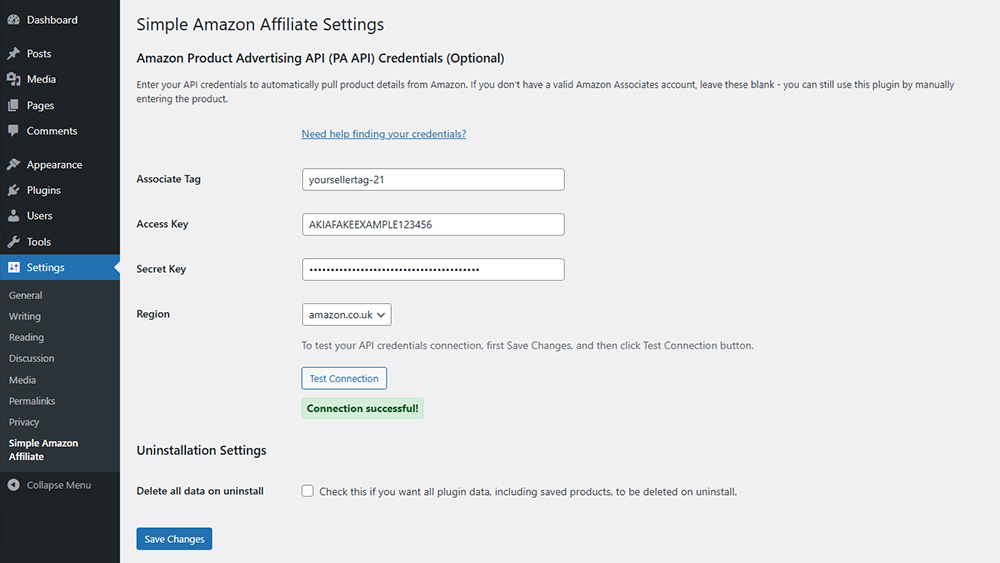
Settings page – connect your Amazon API credentials (optional)

Frontend example – a styled Amazon product box with 'Buy' button
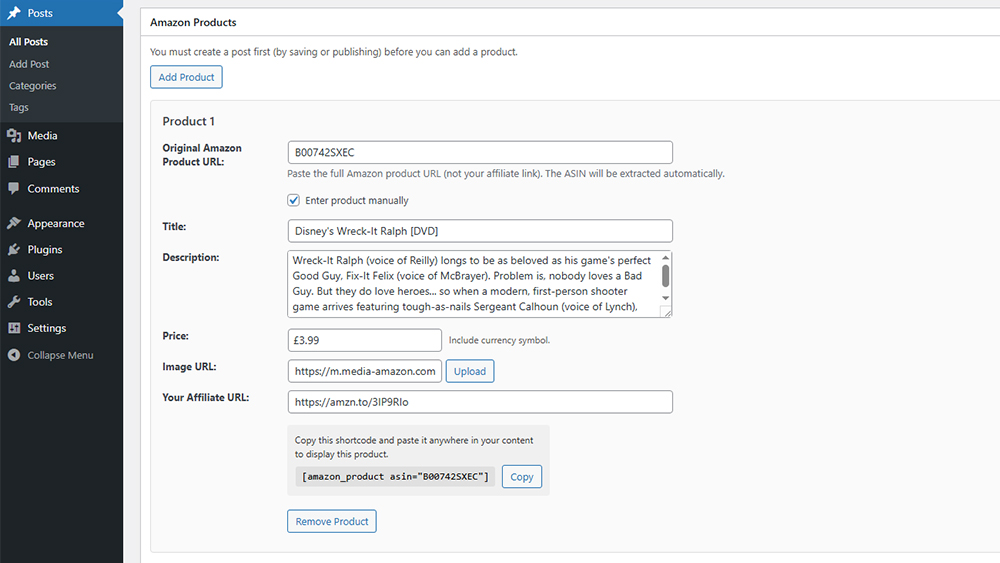
Product metabox – add products directly to posts
Documentation
How it Works
Installation
1. Upload the plugin folder to the ‘/wp-content/plugins/’ directory, or install via the WordPress Plugins screen.
2. Activate the plugin through the ‘Plugins’ screen in WordPress.
Setup
1. (Optional) Go to **Settings → Simple Amazon Affiliate** to enter your Amazon API credentials.
2. If you need help finding your credentials, you can visit Amazon’s help: Where Can I Find My Access Keys?
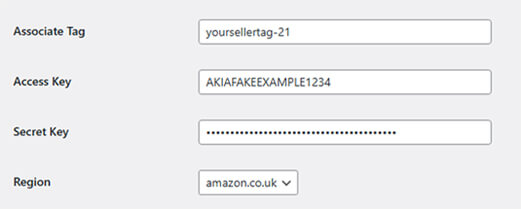
Adding an affliliate product
1. Edit a post or page and use the ‘Add Product’ box to create Amazon product boxes.
2. Insert the generated shortcode where you want the product to appear.
Frequently Asked Questions
After installing the plugin, simply paste your Amazon product URL into your post or page editor. The plugin will automatically convert it into an affiliate link using your tracking ID.
No. The plugin is lightweight and doesn’t load any external scripts or unnecessary code. It only modifies links at the time your content is displayed.
No. It only inserts clean HTML for your product boxes.
Yes. The product shortcode works in both Classic and Block editor.
Yes. The HTML includes the following classes for your own custom CSS:
saa-product-box,
saa-product-link,
saa-product-image,
saa-product-details,
saa-product-title,
saa-product-price,
saa-product-desc,
saa-buy-btn,
saa-disclaimer
No. You can always manually enter your affiliate URL and product details. API credentials are optional and only needed if you want automatic product data.
You can select from the following regional Amazon stores (UK, US, CA, DE, FR, IT, ES, JP, IN) in the settings.
Yes. The plugin simply converts product URLs into affiliate links. You are still responsible for following Amazon’s guidelines (such as displaying an affiliate disclosure on your site).
Only if you check the option under “Uninstallation Settings” in the plugin settings.
Yes. We have a repository of all older versions of this plugin in case you need to refer back to an older version:
Changelog
* Added: support for Bookings for WooCommerce plugin
= 1.2.4, 16 January 2018 =<
* Fixed: correctly remove associated conditions when field is deleted
* Updated: product name for updater<
= 1.2.3, 22 November 2017 =
* Added: Price per character option for text input and textarea fields
* Updated: subtotal calculated directly in JS, not via AJAX
* Updated: allow WooCommerce Product Add Ons Ultimate on simple products only
= 1.2.2, 21 November 2017 =
* Added: Name Your Price field
* Added: min and max attributes for number fields
* Fixed: missing ID attribute in new field type fields
= 1.2.1, 13 November 2017 =
* Added: total field on product page
* Fixed: parse error condition_action
* Fixed: not adding hidden items to cart
* Updated: 'is-not' parameter not allowed for conditions on checkboxes
PRO Version
Ready to start using Simple Amazon Affiliates?
What Our Users Say
The Simple Amazon Affiliate plugin has been a real asset for Skwigly. It makes adding books, films and merchandise to our features and reviews effortless, and it’s given us a simple, reliable way to monetise our content while improving our readers' experience by pointing them to products they might like.

Ben Mitchell, Editor-in-Chief
Skwigly Animation Magazine